Mac AI browser guide 2026
Best AI Browser for Mac: 7 Options Compared for macOS
The best AI browser for Mac depends on whether you want Apple ecosystem integration, private page assistance, source-heavy research, or an agent that can help complete multi-step web tasks. This guide compares the practical trade-offs for Apple Silicon and Intel Macs.
The Short Answer
For most Mac owners, Safari remains the lowest-friction default because it is integrated with macOS, iCloud Keychain, passkeys, battery management, and Apple privacy controls. It is the sensible baseline when you want a stable browser with selected AI features around the Apple ecosystem rather than a browser agent that acts across websites.
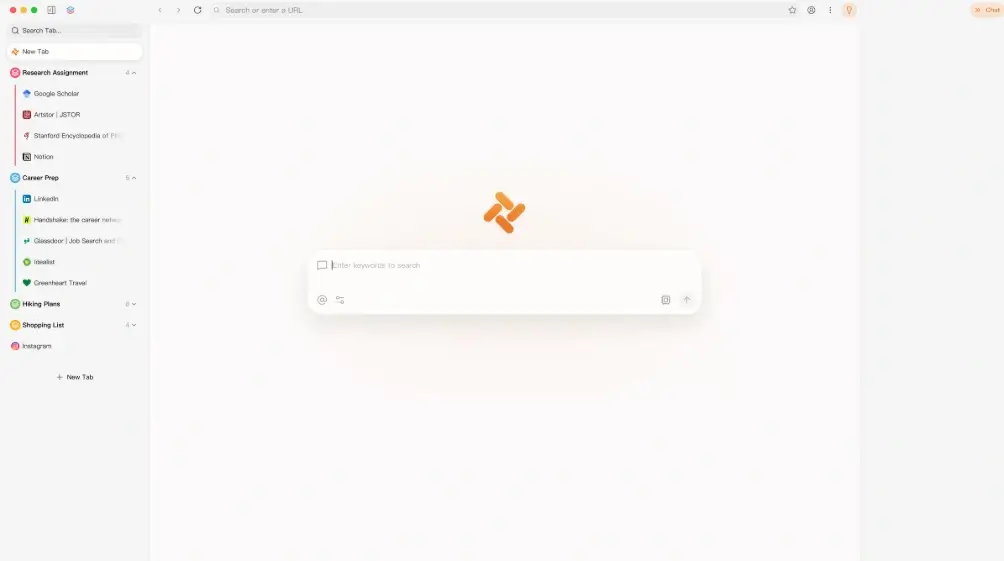
Choose a dedicated AI browser when the assistant must understand several tabs, compare sources, draft from page context, or prepare a repeatable web task. Perplexity Comet is research-oriented, ChatGPT Atlas is attractive to people already working in ChatGPT, Dia emphasizes a calmer context-aware workspace, Brave Leo focuses on assistance with a privacy-forward browser, and Tabbit Browser is relevant when you want natural-language task delegation and multi-model access.
There is no universal winner. The best AI browser for Mac is the one that supports your Mac architecture, keeps sensitive accounts separated, explains what page data the assistant can read, and pauses before downloads, payments, publishing, account changes, or form submissions. Keep Safari or another trusted browser for high-risk accounts until a new AI browser proves reliable in real work.
Also separate assistants from agents. An assistant summarizes, answers, or drafts; an agent plans and performs multiple steps. For confidential work, limited assistance is usually the safer starting point. If you need delegation, prefer a visible plan, narrowly scoped tools, a preview before submission, and an action log you can review.
Best AI Browser for Mac: 7 Options Compared
The table separates system fit from AI capability. Availability, pricing, memory, and agent permissions change quickly, so verify the current official product page before installing.
| Browser | Best Mac fit | AI strength | Watch out for |
|---|---|---|---|
| Safari with Apple Intelligence | Best default for people who value battery life, iCloud integration, passkeys, familiar privacy settings, and Apple-native continuity. | System-level writing and intelligence features where Apple supports them, plus a stable macOS browser foundation. | It is not a full autonomous browser agent. Feature availability depends on device, language, region, and macOS version. |
| Tabbit Browser | Best for Mac users who want an AI-native browser for research, tab organization, multi-model work, and supervised task delegation. | Natural-language workflows, background tasks, page-context assistance, and multi-model access in one browser workspace. | Choose the Apple Silicon or Intel installer correctly and review agent permissions before connecting private accounts. |
| Perplexity Comet | Strong for researchers, students, analysts, and writers who compare many pages and want answer-first browsing. | Cross-page research, source comparison, citations, and page-aware questions. | Check current macOS availability, plan limits, data controls, and how much browsing context is retained. |
| ChatGPT Atlas | A natural fit for Mac users whose notes, projects, and drafting workflows already live in ChatGPT. | ChatGPT continuity, page-aware drafting, comparison, and agent-style assistance where supported. | Review memory, workspace policy, platform support, and confirmation steps before allowing actions. |
| Dia | Useful for knowledge workers who want a focused AI-native workspace built around tabs, reading, and writing. | Context-aware assistance and a calmer workflow-oriented interface. | Confirm supported Mac models, import needs, account requirements, and whether its narrower workflow fits your daily work. |
| Brave Leo | Good for people who want built-in AI help while keeping a familiar privacy-focused Chromium browser. | Page summaries, writing assistance, and model choices without making autonomous actions the center of the product. | Better for assistance than delegation; verify premium limits and model/data settings. |
| Microsoft Edge Copilot | Useful on Mac when your work depends on Microsoft 365, corporate accounts, PDFs, and cross-platform team policy. | Copilot sidebar, document assistance, and Microsoft account integration. | It is less Mac-native than Safari, and organization policy may determine which AI features can access work data. |
What Mac Users Should Check Before Installing
A Mac-compatible download is not enough. Match the installer, macOS version, privacy model, and approval controls to the way you actually browse.
Identify Apple Silicon or Intel
Open About This Mac and check the chip before downloading. Apple M-series Macs need the ARM/Apple Silicon build; older Intel Macs need the Intel build when the vendor still provides one.
Confirm the macOS requirement
Check the minimum macOS release and available storage. The currently verified Tabbit international Mac installers target macOS 12 or newer, but every browser has its own support window.
Use a verified first-party source
Follow the vendor's official product or release page. Avoid mirrors, repackaged DMGs, shortened URLs, and pages that hide the final installer host.
Review page, history, and memory access
Check whether the assistant can read only the current page, all open tabs, browsing history, uploaded files, clipboard content, or saved memories. Disable what you do not need.
Require approval for consequential actions
The browser should stop before sending messages, downloading files, making purchases, changing accounts, publishing content, or submitting forms with personal data.
Test battery, memory, and recovery
Run the same real workflow in two browsers and watch energy use, memory pressure, latency, source accuracy, and how easily you can stop or correct the assistant.
Real AI Browser Workflow Visuals
The page uses official Tabbit product media rather than generated or simulated Mac screenshots. The comparison table above is the third visual decision aid.
AI-native browser workspace
A real Tabbit product view showing why an AI-native browser feels different from adding a chatbot sidebar to a conventional browser.
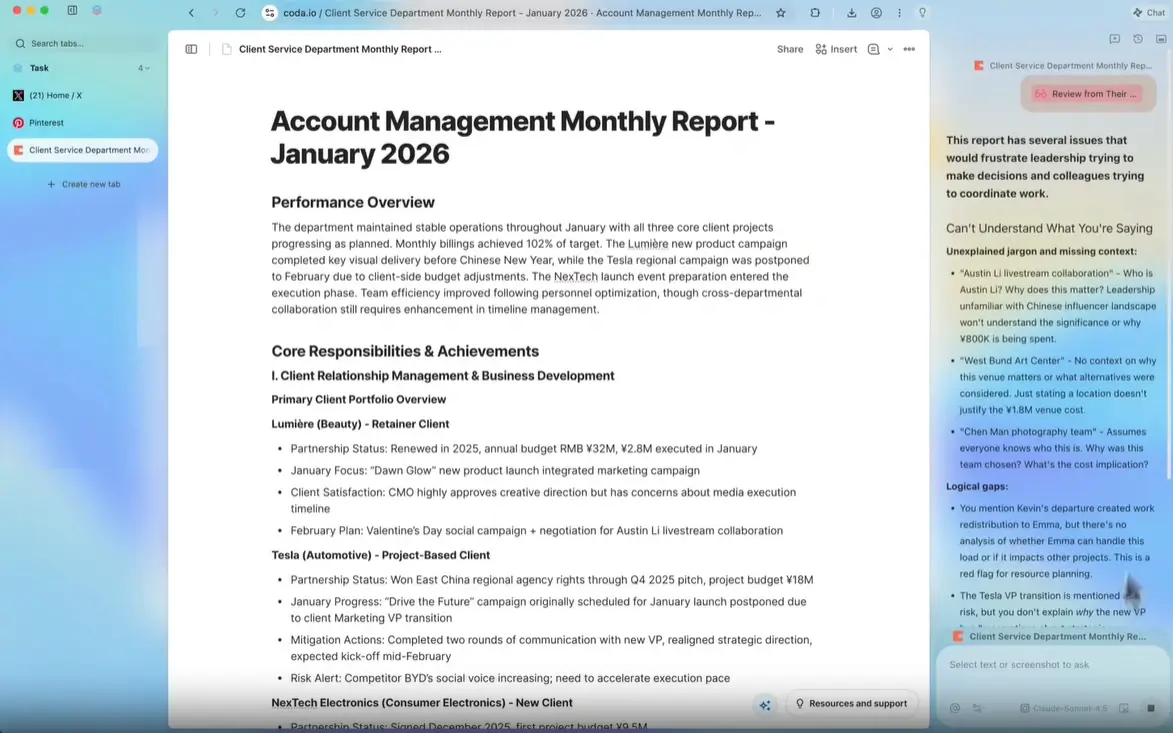
Supervised workflow controls
Mac users should judge an agent browser by visible context and control: what it can read, what it plans to do, and where human approval is required.
How to Test an AI Browser on Mac Safely
Use a staged setup instead of importing every password, account, extension, and browsing history on day one.
Choose one primary job
Decide whether you need research, writing, private page assistance, Microsoft integration, or multi-step automation. A focused test makes comparison more meaningful.
Create a separate test profile
Import only public bookmarks and use non-sensitive accounts first. Keep banking, password management, admin consoles, health portals, and confidential client work in your established browser.
Audit permissions and defaults
Review page-reading, history, memory, downloads, microphone, camera, notifications, clipboard, extension, and model-training settings before testing the assistant.
Run the same four-part test
Ask each browser to summarize one long page, compare three sources, draft a short note, and prepare a low-risk task without submitting it. Compare accuracy, citations, control, speed, and recovery.
Keep a rollback path
Do not uninstall Safari or your trusted daily browser. Export important data, know how to revoke connected accounts, and remove the AI browser cleanly if its privacy or reliability does not fit.
Related AI Browser Guides
Use these pages for broader rankings, Windows-specific choices, safe installer checks, and browser-agent risk controls.
Best AI Browsers
Compare current AI browsers across research, privacy, agent capability, and daily workflow fit.
Best AI Browser for Windows
See the separate PC comparison when Windows support and Microsoft integration matter more than macOS fit.
Tabbit Browser Download
Check verified Windows and macOS installer paths, current version details, architecture, and system requirements.
Browser Agent Security Risk
Understand prompt injection, page access, data exposure, and approval risks before delegating tasks.
Official Sources to Recheck
Platform availability and AI features change. Recheck these first-party pages before installing or standardizing a browser for sensitive work.
Try a Mac AI Browser with a Controlled Test Workflow
Tabbit Browser currently provides separate macOS DMGs for Apple Silicon and Intel. The latest verifiable international stable files remain v1.0.29, updated June 8, 2026 and rechecked July 30, 2026.
FAQ
Direct answers to common questions about AI browsers for Mac and macOS.
What is the best AI browser for Mac?
Safari is the safest baseline for Apple ecosystem integration and battery efficiency. Comet is strong for research, Atlas for ChatGPT-centered work, Brave Leo for privacy-forward assistance, Dia for a focused AI workspace, and Tabbit for supervised multi-step browser tasks.
Which AI browser is best for an Apple Silicon Mac?
Prefer a browser with a native Apple Silicon build and current macOS support. Tabbit provides an Apple Silicon DMG, while other vendors publish their own compatibility requirements. Always verify the current official page before installing.
Does Tabbit Browser work on Intel Macs?
A separate Tabbit Intel macOS DMG is currently available from the Tabbit-controlled release host. The verified international stable build is v1.0.29, and the file responded successfully when rechecked on July 30, 2026.
Should I replace Safari with an AI browser?
Not immediately. Keep Safari or another trusted browser for sensitive accounts, then test the AI browser in a separate profile with public research and low-risk tasks. Replace your default only after privacy, battery use, reliability, and recovery meet your needs.
Are AI browsers safe for passwords and banking on Mac?
Do not assume so. Use the established browser and password manager you already trust for banking and high-risk accounts. Limit AI page access, memory, extensions, and automation until the permission model is clear.
How much memory does an AI browser need on Mac?
There is no single number because tab count, local models, extensions, and agent tasks vary. A Mac with 8 GB can handle light browsing, but 16 GB or more gives more headroom for many tabs and AI workflows. Test memory pressure during your actual workload.