Browser automation decision guide
Playwright vs Agent Browser: When Should You Script or Delegate?
Playwright is best when you need deterministic browser automation, repeatable tests, and stable selectors. An agent browser is better when the web task changes, requires judgment, or needs a person to supervise AI-driven steps.
The Short Answer
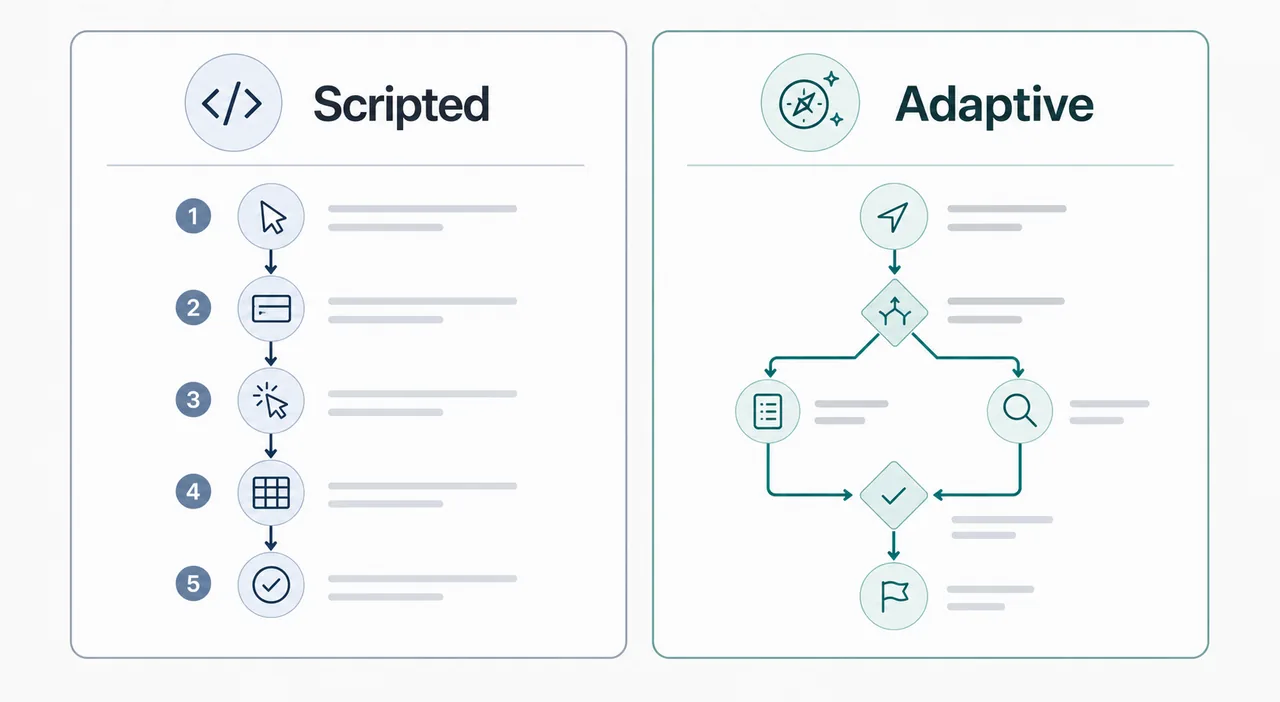
Choose Playwright when the job can be described as code: open this URL, wait for this selector, click this button, assert this result, and run it again in CI. It is predictable, inspectable, and ideal for testing or production automation where failure should be explicit.
Choose an agent browser when the task is more like a supervised workflow: research three pages, compare options, adapt when the page layout changes, summarize findings, or complete a low-risk repetitive browser task with human approval. The agent adds judgment, but it also adds uncertainty, latency, and safety requirements.
The strongest setup is often hybrid. Use Playwright for the stable rails around login, page loading, screenshots, and regression checks. Use an agent browser such as Tabbit Browser for exploratory steps, natural-language task setup, research, and background workflows where a human can review the result before anything sensitive happens.
Playwright vs Agent Browser Compared
Both operate a browser, but they solve different problems. The decision depends on predictability, risk, and how much human judgment the task needs.
| Factor | Playwright | Agent browser | Best decision |
|---|---|---|---|
| Primary job | Scripted browser control for tests, scraping checks, screenshots, and repeatable workflows. | AI-guided browsing that can read context, choose next steps, and explain what it did. | Use Playwright for exact repeatability; use an agent browser for adaptive work. |
| Reliability model | Deterministic when selectors, waits, fixtures, and network state are controlled. | Probabilistic because the model interprets pages and may choose different actions. | Choose Playwright when the same result must happen every run. |
| Changing websites | Breaks when selectors, flows, or authentication assumptions change. | Can often recover from changed labels, page copy, and navigation patterns. | Use an agent browser for exploratory or changing workflows. |
| Sensitive actions | Safe only if the script is reviewed, scoped, and tested against the right environment. | Requires explicit approvals, boundaries, logs, and blocked actions for purchases, deletes, and account changes. | Keep sensitive work scripted or gated by human approval. |
| Best users | Developers, QA teams, automation engineers, and CI pipelines. | Operators, founders, researchers, support teams, and power users delegating browser tasks. | Match the tool to who owns the workflow. |
How to Choose the Right Browser Automation Approach
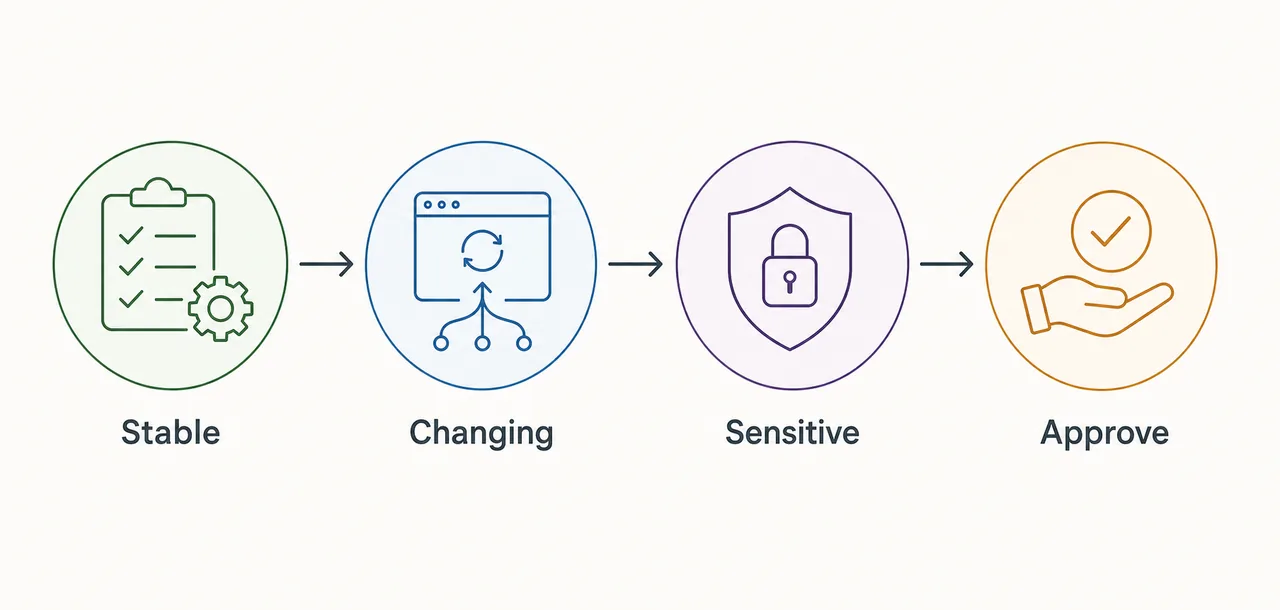
Start with the task shape, not the tool name. Stable, high-volume tasks want code. Ambiguous tasks want reviewable AI assistance.
Use Playwright for repeatable paths
Checkout tests, login smoke tests, PDF capture, visual screenshots, and form validation should be scripted. You want fast failure, version control, and logs that engineers can reproduce.
Use an agent browser for judgment-heavy tasks
Research, comparison, support triage, lead collection, and multi-tab summarization often need interpretation. An agent browser can adapt, explain, and ask before it acts.
Protect accounts with approval checkpoints
Do not let either approach submit payments, delete records, publish content, or change settings without a clear approval boundary. Agent browsers especially need visible review before irreversible actions.
Practical Workflow Playbooks
These patterns keep the automation reliable without forcing every task into one tool.
Testing playbook
Use Playwright to run smoke tests, capture screenshots, validate metadata, and detect layout regressions. Keep selectors stable and make failures block the release.
Research playbook
Use an agent browser to open several sources, summarize differences, and create a draft decision. Require the user to check citations and final actions.
Hybrid playbook
Let Playwright handle repeatable setup and evidence capture, then let an agent browser assist with non-deterministic reading, comparison, and next-step suggestions.
Governance playbook
Define allowed domains, blocked actions, approval steps, and logs before delegating browser work. This matters more than the brand name of the automation tool.
Limits and Risks to Plan For
The wrong choice usually fails in predictable ways: brittle scripts, over-trusting agents, or missing review steps.
Brittle selectors
Playwright scripts can be excellent and still fail when a product team renames buttons or changes component structure. Use resilient selectors and keep test scope focused.
Agent overreach
An agent browser can misunderstand a page or take a step you did not expect. Use approvals for account changes, submissions, downloads, and external communications.
Latency and cost
Scripted automation is usually faster. Agent browsing may take longer because it reads, reasons, and waits for model output, so reserve it for tasks where adaptability matters.
Official References Worth Checking
Feature details change quickly, so verify current capabilities and limits before standardizing on a workflow.
Try a Browser Built for Delegated AI Workflows
Use scripts where precision matters, then use Tabbit Browser when you want AI-assisted research, task delegation, and supervised browser workflows.
FAQ
Short answers for teams comparing Playwright, browser automation, and agent browsers.
Is an agent browser a replacement for Playwright?
No. An agent browser is not a clean replacement for Playwright testing. Playwright is better for deterministic tests and CI. An agent browser is better for adaptive, supervised workflows where judgment matters.
Can Playwright use AI?
Playwright can be combined with AI tools, but its core strength remains scripted browser automation. If you need model-driven decisions inside the browser, treat that as a separate agent layer with its own safety checks.
Which is safer for work accounts?
Neither is automatically safe. Playwright scripts need code review and environment boundaries. Agent browsers need approval checkpoints, blocked actions, and clear data access rules.
When should a non-developer use an agent browser?
A non-developer should use an agent browser for repeatable research, page summarization, comparison, and low-risk task preparation. Anything involving money, publishing, deletion, or private customer data should stay supervised.
What is the best hybrid setup?
Use Playwright for stable setup, screenshots, smoke checks, and evidence. Use an agent browser for reading, comparing, summarizing, and deciding next steps, with human review before final action.